Six ways to fire many REST calls at once from Oracle, and how to pick one
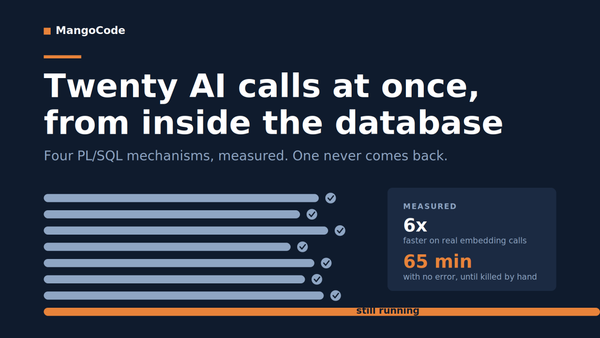
Last time I wrote about this I had four mechanisms and a ranking: I saw a Go program fire twenty AI calls at once. Could I do that in PL/SQL?. Now I have six mechanisms and no ranking, because when I put them all on the same measurement basis the throughput differences disappeared.
That turns out to be the more useful article. If they all run at the same speed, the question stops being which is fastest and becomes which one fits what you are building. So this is the working code for all six, and what each one is actually for.
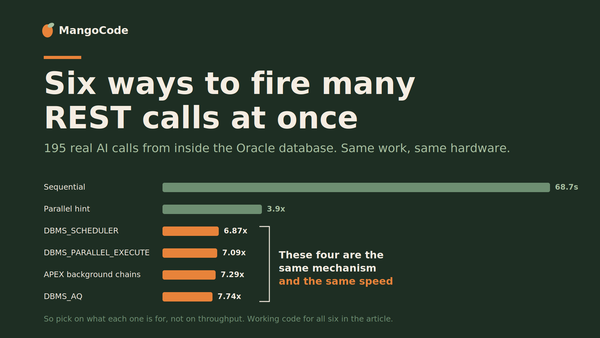
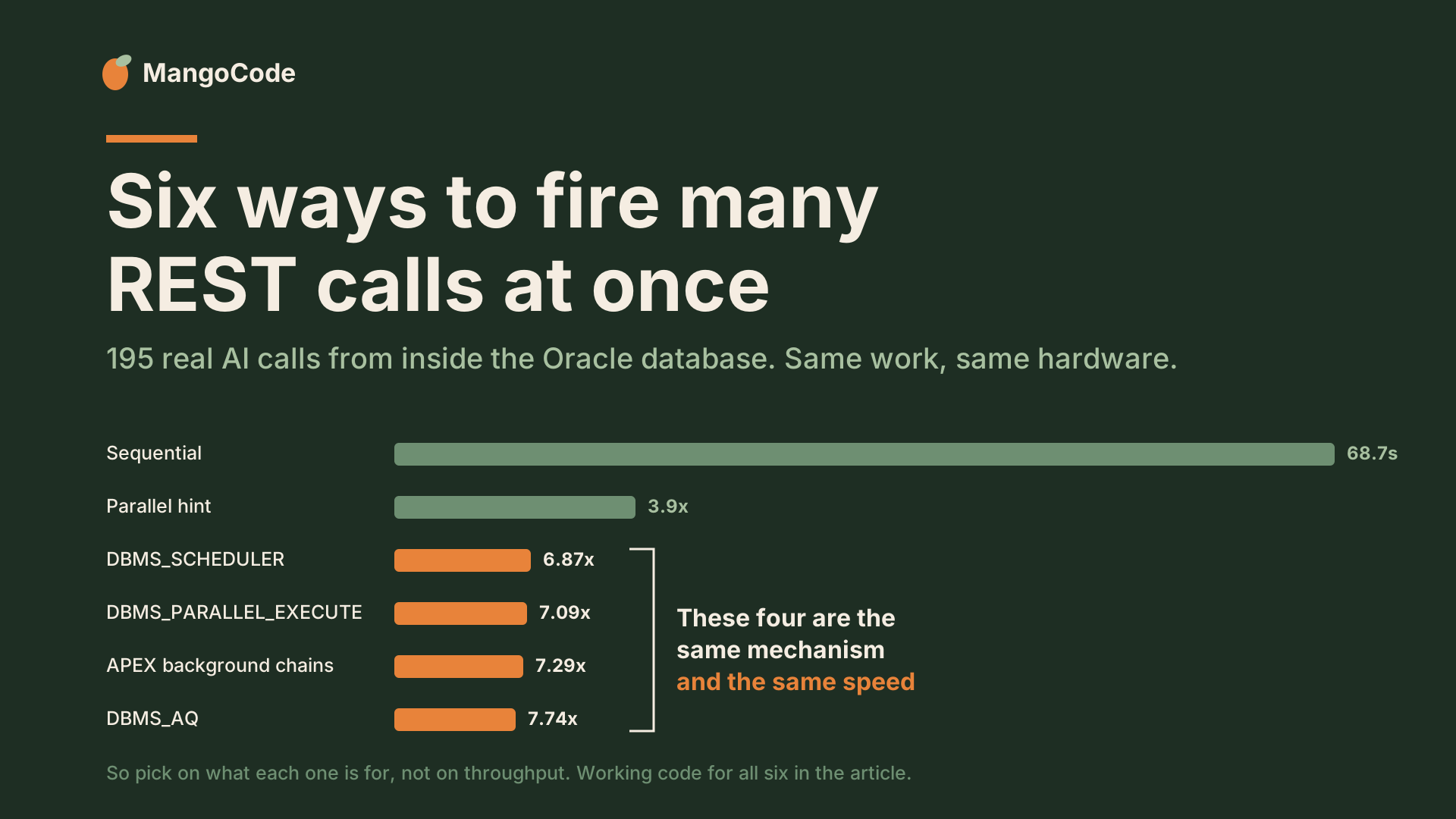
TL;DR: PL/SQL has no asynchronous HTTP, so N calls at once needs N sessions, and every way of getting them is job-based. On a like-for-like basis the four job-based mechanisms are indistinguishable, landing between 6.87x and 7.74x on 195 real embedding calls with overlapping ranges. Pick on properties instead: DBMS_PARALLEL_EXECUTE for a known batch of rows, DBMS_SCHEDULER when the work is not rows, DBMS_AQ when requests arrive over time, APEX background chains when a user is watching. Code for all six below.
Why there is more than one answer at all
UTL_HTTP and APEX_WEB_SERVICE.MAKE_REST_REQUEST block the calling session for the whole round trip. No callback, no handle to check later, no non-blocking I/O underneath to build one on. One session holds exactly one REST call in flight.
So twenty calls at once means twenty sessions. Every mechanism below is a different way of getting more sessions and handing each of them some work.
I do this kind of work at Qualogy, building Oracle APEX applications and integrations for enterprise clients, which is why I had a real embedding workload to test all of this against.
In all the code below, do_item is whatever your per-row work is. In my case it makes one embedding call and logs the result. Substitute your own.
1. Sequential
The baseline, and the right answer more often than people admit.
FOR d IN (SELECT doc_id FROM pq_docs ORDER BY doc_id) LOOP
    pkg_par_bench.do_item(
        p_run_id     => l_run_id,
        p_doc_id     => d.doc_id,
        p_tier       => p_tier,
        p_worker_tag => 'SEQ');
END LOOP;
Forty rows and nobody waiting? Stop here. Everything below costs you setup, debugging and a new class of failure.
2. DBMS_SCHEDULER
Create one job per worker, hand each a slice, poll until they are gone.
FOR i IN 0 .. p_workers - 1 LOOP
    l_job_name := 'PQ_SCHED_' || l_run_id || '_' || i;

    DBMS_SCHEDULER.CREATE_JOB(
        job_name            => l_job_name,
        job_type            => 'STORED_PROCEDURE',
        job_action          => 'PKG_PAR_SCHED.RUN_CHUNK',
        number_of_arguments => 5,
        enabled             => FALSE,
        auto_drop           => TRUE);

    DBMS_SCHEDULER.SET_JOB_ARGUMENT_VALUE(
        job_name => l_job_name, argument_position => 1, argument_value => l_run_id);
    DBMS_SCHEDULER.SET_JOB_ARGUMENT_VALUE(
        job_name => l_job_name, argument_position => 3, argument_value => i);
    DBMS_SCHEDULER.SET_JOB_ARGUMENT_VALUE(
        job_name => l_job_name, argument_position => 4, argument_value => p_workers);

    DBMS_SCHEDULER.ENABLE(l_job_name);
END LOOP;
Each job takes every Nth row, so the eight of them never need to coordinate:
FOR d IN (
    SELECT doc_id FROM (
        SELECT doc_id,
               MOD(ROW_NUMBER() OVER (ORDER BY doc_id) - 1, p_num_workers) AS bucket
        FROM   pq_docs
    )
    WHERE bucket = p_worker_no
) LOOP
    pkg_par_bench.do_item(
        p_run_id     => p_run_id,
        p_doc_id     => d.doc_id,
        p_tier       => p_tier,
        p_worker_tag => 'SCHED:' || p_worker_no);
END LOOP;
That round-robin split matters when your rows cost different amounts. Give worker 3 a contiguous range and it may get every long document; give it every eighth row and the expensive ones spread out.
auto_drop => TRUE means a finished job deletes itself, so "none of my jobs are listed" is a clean completion signal:
LOOP
    SELECT COUNT(*) INTO l_remaining
    FROM   user_scheduler_jobs
    WHERE  job_name LIKE 'PQ_SCHED_' || l_run_id || '\_%' ESCAPE '\';

    EXIT WHEN l_remaining = 0 OR l_elapsed >= p_max_wait_secs;
    DBMS_SESSION.SLEEP(2);
    l_elapsed := l_elapsed + 2;
END LOOP;TIP: Use named notation on SET_JOB_ARGUMENT_VALUE. It has two overloads differing only in whether the second parameter is a position or a name, and a bare integer positionally gives you PLS-00307: too many declarations of SET_JOB_ARGUMENT_VALUE match this call.
3. DBMS_PARALLEL_EXECUTE
Same idea, Oracle does the splitting.
DBMS_PARALLEL_EXECUTE.CREATE_TASK(l_task_name);

DBMS_PARALLEL_EXECUTE.CREATE_CHUNKS_BY_NUMBER_COL(
    task_name    => l_task_name,
    table_owner  => USER,
    table_name   => 'PQ_DOCS',
    table_column => 'DOC_ID',
    chunk_size   => CEIL(l_doc_count / (p_workers * 4)));

DBMS_PARALLEL_EXECUTE.RUN_TASK(
    task_name      => l_task_name,
    sql_stmt       => 'BEGIN pkg_par_dbmspe.run_chunk(' || l_run_id
                       || ', ''' || p_tier || ''', :start_id, :end_id); END;',
    language_flag  => DBMS_SQL.NATIVE,
    parallel_level => p_workers);

DBMS_PARALLEL_EXECUTE.DROP_TASK(l_task_name);
The chunk procedure takes a range and processes it:
PROCEDURE run_chunk (p_run_id NUMBER, p_tier VARCHAR2,
                     p_start_id NUMBER, p_end_id NUMBER)
IS
BEGIN
    FOR d IN (SELECT doc_id FROM pq_docs
              WHERE doc_id BETWEEN p_start_id AND p_end_id) LOOP
        pkg_par_bench.do_item(
            p_run_id     => p_run_id,
            p_doc_id     => d.doc_id,
            p_tier       => p_tier,
            p_worker_tag => 'DBMSPE:' || SYS_CONTEXT('USERENV','SID'));
    END LOOP;
END run_chunk;
Error status per chunk, free:
SELECT COUNT(*) INTO l_error_count
FROM   user_parallel_execute_chunks
WHERE  task_name = l_task_name
AND    status = 'PROCESSED_WITH_ERROR';
Note the p_workers * 4 in the chunk sizing. Chunk size and worker count are separate decisions: chunk size is how much work goes in one unit, parallel_level is how many workers pull from the pile. Chunks are not pre-assigned, workers grab the next unclaimed one. So you want more chunks than workers, or one slow chunk leaves seven workers idle at the end. Three to five per worker is a reasonable start.
4. DBMS_AQ
Enqueue every unit of work, run a pool of consumers that each pull the next message.
CREATE OR REPLACE TYPE pq_aq_payload_t AS OBJECT (
    run_id NUMBER, doc_id NUMBER, tier VARCHAR2(20));
/

BEGIN
    DBMS_AQADM.CREATE_QUEUE_TABLE(
        queue_table        => 'PQ_AQ_QUEUE_TAB',
        queue_payload_type => 'PQ_AQ_PAYLOAD_T');
    DBMS_AQADM.CREATE_QUEUE(
        queue_name  => 'PQ_AQ_QUEUE',
        queue_table => 'PQ_AQ_QUEUE_TAB');
    DBMS_AQADM.START_QUEUE(queue_name => 'PQ_AQ_QUEUE');
END;
/
Each consumer runs this until the queue is dry:
LOOP
    BEGIN
        DBMS_AQ.DEQUEUE(
            queue_name         => 'PQ_AQ_QUEUE',
            dequeue_options    => l_deq_opt,
            message_properties => l_msg_prop,
            payload            => l_payload,
            msgid              => l_msgid);

        COMMIT;   -- releases the message lock before the slow call

        pkg_par_bench.do_item(
            p_run_id     => l_payload.run_id,
            p_doc_id     => l_payload.doc_id,
            p_tier       => l_payload.tier,
            p_worker_tag => 'AQ:' || p_worker_no);
    EXCEPTION
        WHEN OTHERS THEN
            IF SQLCODE = -25228 THEN   -- dequeue timeout: queue is empty
                EXIT;
            ELSE
                RAISE;
            END IF;
    END;
END LOOP;
Nothing is pre-assigned, so a consumer that dies does not take a whole slice with it the way a job holding a row range does. Workers do not know or need to know how many messages exist: ORA-25228 on the dequeue timeout means empty, which means finished.
The reason to reach for this is shape, not speed. Chunking needs a table to chunk. When requests arrive one at a time from different users there is nothing to split, and a job per request means paying job startup on every single one.
Everything about how this behaves under failure comes down to where that COMMIT sits. Committing before the work releases the message lock so you are not holding it across a 350ms call, but the message is gone before the work succeeded, so a consumer that dies there loses its item. Commit after do_item instead and you get the durability people assume they are buying, at the cost of every consumer holding a lock for the length of its call. Decide which before you write the loop.
5. APEX background execution chains
The one mechanism you cannot drive from SQLcl at all, because running in the background is a page process property rather than an API you call.
The trap first, because it is the whole design. Oracle's documentation is explicit that child processes of an Execution Chain run one after the other. No setting changes that. So this gives you a sequential run wrapped in a scheduler job:
BENCHMARK_CHAIN  (Execution Chain, Execute in Background)
  ├── WORKER_1
  ├── WORKER_2      <- these run in sequence, not together
  └── WORKER_3
Concurrency comes from separate chains. Eight workers means eight chains with one child each, all on the same button:
WORKER_1_CHAIN  (Execution Chain, Execute in Background)
  └── WORKER_1  (Execute Code: pkg_par_apexbg.run(p_worker_no => 1, ...))
WORKER_2_CHAIN  (Execution Chain, Execute in Background)
  └── WORKER_2  (Execute Code: pkg_par_apexbg.run(p_worker_no => 2, ...))
...
Do not use :APP_SESSION as a shared key. Your page runs inside an APEX session, and :APP_SESSION is that session's ID. It looks like the obvious way for eight workers to agree on which run they belong to. But a backgrounded chain does not run inside your page's session. It runs as a scheduler job that starts its own new APEX session, and each of the eight starts a different one. So :APP_SESSION inside worker 1 returns one number, inside worker 2 a different number, and none of them is the number your page had. All eight look up a key that does not exist:
WORKER_1_CHAIN  Executed with Failure
  ORA-20901: no pq_runs row for batch_tag "214934093587910"
WORKER_2_CHAIN  Executed with Failure
  ORA-20901: no pq_runs row for batch_tag "205240055737222"
Use a hidden page item instead, set once by the synchronous process that runs first:
BEGIN
    :P200_BATCH_TAG := TO_CHAR(SYSTIMESTAMP,'YYYYMMDDHH24MISSFF6');
    pkg_par_apexbg.start_batch(
        p_batch_tag   => :P200_BATCH_TAG,
        p_tier        => 'COHERE',
        p_num_workers => 8);
END;
Page item values are part of the request state and get carried into the background job. Session identity is not.
What you get in exchange is the one thing no other mechanism here gives you for free:
APEX_BACKGROUND_PROCESS.SET_PROGRESS(
    p_totalwork => l_total,
    p_sofar     => l_processed);
which lands in a view you can report on while the run is still going:
SELECT process_name, status, sofar, totalwork,
       ROUND(sofar / NULLIF(totalwork, 0) * 100) AS PROGRESS_PCT
FROM   apex_appl_page_bg_proc_status
WHERE  application_id = :APP_ID AND page_id = 200
ORDER  BY process_name
Put a classic report on that with a percent-graph column and a refresh timer and you can watch eight workers fill up live. Keep the alias uppercase, or APEX's wrapper query gives you ORA-00904: "D"."totalwork": invalid identifier.
One thing it does not give you: any signal that the work finished. The request that launched the chains returned a page to the browser long ago. Plan how you will detect completion before you build on this.
6. A parallel hint
The odd one out, using PX query slaves rather than jobs.
EXECUTE IMMEDIATE 'ALTER SESSION ENABLE PARALLEL DML';

UPDATE /*+ parallel(d, 8) */ pq_docs d
SET    embedding = pkg_par_bench.do_item_sql(:1, d.doc_id, d.chunk_text, :2)
WHERE  d.doc_id <= :3;
That ALTER SESSION is not optional. Without it the driving SELECT goes parallel while the UPDATE runs serially, which looks exactly like the hint doing nothing.
Two reasons I would not reach for this. It gave me half the degree I requested on medium and high, and only tpurgent honoured the hint in full. And across 14 runs of the identical statement it landed on DOP 4 eight times, DOP 1 four times and DOP 8 twice. The job-based mechanisms cluster tightly run to run. This one does not cluster at all.
What the numbers say
195 rows, real embedding calls, eight workers requested, measured first row start to last row end so no mechanism is charged for its own submission overhead:
| Mechanism | Mean | Range |
|---|---|---|
DBMS_AQ | 7.74x | 7.67x to 7.84x |
| APEX background chains | 7.29x | 6.87x to 7.63x |
DBMS_PARALLEL_EXECUTE | 7.09x | 6.54x to 7.44x |
DBMS_SCHEDULER | 6.87x | 5.76x to 7.46x |
Three of those four ranges overlap almost entirely.
They perform alike because they are the same thing underneath. DBMS_PARALLEL_EXECUTE creates DBMS_SCHEDULER jobs. APEX background chains wrap DBMS_SCHEDULER. The AQ consumer pool is DBMS_SCHEDULER jobs. Four APIs, one pool of job slaves, bounded by the same JOB_QUEUE_PROCESSES.
How I would actually choose
A known batch of rows, nobody watching: DBMS_PARALLEL_EXECUTE.
Work that is not row-shaped, or a split you want to control: DBMS_SCHEDULER.
Requests arriving over time: DBMS_AQ.
A user sitting there watching: APEX background execution chains, for the free progress reporting rather than the speed.
Forty rows and no deadline: the sequential loop.
One thing worth being clear about before you build any of this. None of it makes the work cheaper. You are not doing less work, you are doing the same work in less time by occupying more of the database at once. Eight workers means eight sessions held open, each one sitting on a socket waiting for a reply and unavailable to anybody else until the call returns.
All six mechanisms, the benchmark harness and the measurement scripts are on GitHub: oracle-parallel-execution-benchmark
Which of these have you used in production, and did you pick it deliberately or because it was the one you already knew?