Three fixes for a lost checkbox, and the first click was never saved
Restoring Interactive Grid checkbox selections in defaultGridViewOptions.pageChange does not work, because APEX applies its own pageChange last. Use a gridpagechange event listener instead, with working code and a diagnostic table.
How to keep an Oracle APEX Interactive Grid selection across filter refreshes and the callback APEX quietly takes back.
TL;DR: If your Oracle APEX Interactive Grid loses its checkbox selection after a refresh and you try to restore it in defaultGridViewOptions.pageChange, that callback will never run. APEX passes its own grid options after yours and its own pageChange wins. Listen to the gridpagechange event on the grid view instead. The full working setup is below, step by step.
The symptom was simple to describe: the Interactive Grid loses its checkbox selection after a refresh. It came up on a client project, which is most of what I do at Qualogy: building and fixing Oracle APEX applications that people use all day. I cannot show that application, so I rebuilt the same problem with my anime dataset.
The page has an Interactive Grid with every anime in the database. Above it sits a studio select list. Picking a studio shrinks the grid to that studio's titles. Users wanted to build one selection across studios instead of scrolling the full list: pick Madhouse and tick Frieren, switch to MAPPA and tick Jujutsu Kaisen, switch to Ufotable and tick Demon Slayer.
What happened instead: after switching to MAPPA, Frieren was still on screen but its checkbox was empty. Tick Jujutsu Kaisen, switch again and Frieren was gone entirely.
I worked through it with GitHub Copilot. It proposed three fixes that looked right and none of them worked. It still took me less time than the old way of searching Google for examples, but only because I kept checking what it told me. This article is the guide I would have wanted at the start, so you do not have to repeat that route.
The code is a generalized version of what ran at the client, with the anime names swapped in. It has not been run in exactly this form, so test it in your own application.
A bit of APEX context
- An Interactive Grid is APEX's spreadsheet-like report region, with row checkboxes and its own selection state in the browser.
- An APEX collection is a temporary table that lives for the user's session. Queries can read it like a normal table.
- A Dynamic Action is APEX's declarative "when this happens in the browser, do that".
- An Ajax callback is a PL/SQL process that JavaScript calls with
apex.server.process. Values sent asf01,f02arrive in PL/SQL asapex_application.g_f01,apex_application.g_f02.
Two kinds of "selected"
The selection was already stored in a collection and the grid's query included those rows next to the studio's own titles:
or a.anime_id in (
    select to_number(c001)
    from   apex_collections
    where  collection_name = 'SELECTED_ANIME'
)
That is why Frieren was still visible after the first switch. However, showing a row and ticking its checkbox are two separate things. The refreshed grid has no idea that Frieren should be ticked.
And the JavaScript that saved the selection only sent what was ticked in the grid at that moment. After the refresh Frieren was unticked, so ticking Jujutsu Kaisen sent only Jujutsu Kaisen, the collection was replaced with that one ID and Frieren dropped out of the query.
So two things were needed: keep the full set of selected IDs in the browser and put the checkmarks back after every refresh.
Security note: that or lets rows in that the studio filter would exclude, and the IDs come from the browser. If your query also enforces who may see which rows, keep that check outside the or.
The design
1. An accumulated set of IDs. A JavaScript Set holds every selected anime across studios. Loaded rows that are no longer ticked are removed, ticked rows are added. Rows from other studios are not loaded, so they are never removed.
2. A guard during refreshes. The save function runs on every selection change and sends the whole set to an Ajax callback, which writes it to the collection. A refresh can fire a selection change with nothing selected, so a refreshing flag makes the save function ignore events while the grid refreshes. Something has to lower that flag after every refresh, or real clicks are ignored too.
3. Save before refreshing. The Ajax calls run in a named queue and the studio refresh waits for the last save.
4. Restore after refreshing. Once the grid has drawn the new rows, the checkmarks go back without triggering a save and the guard comes down.
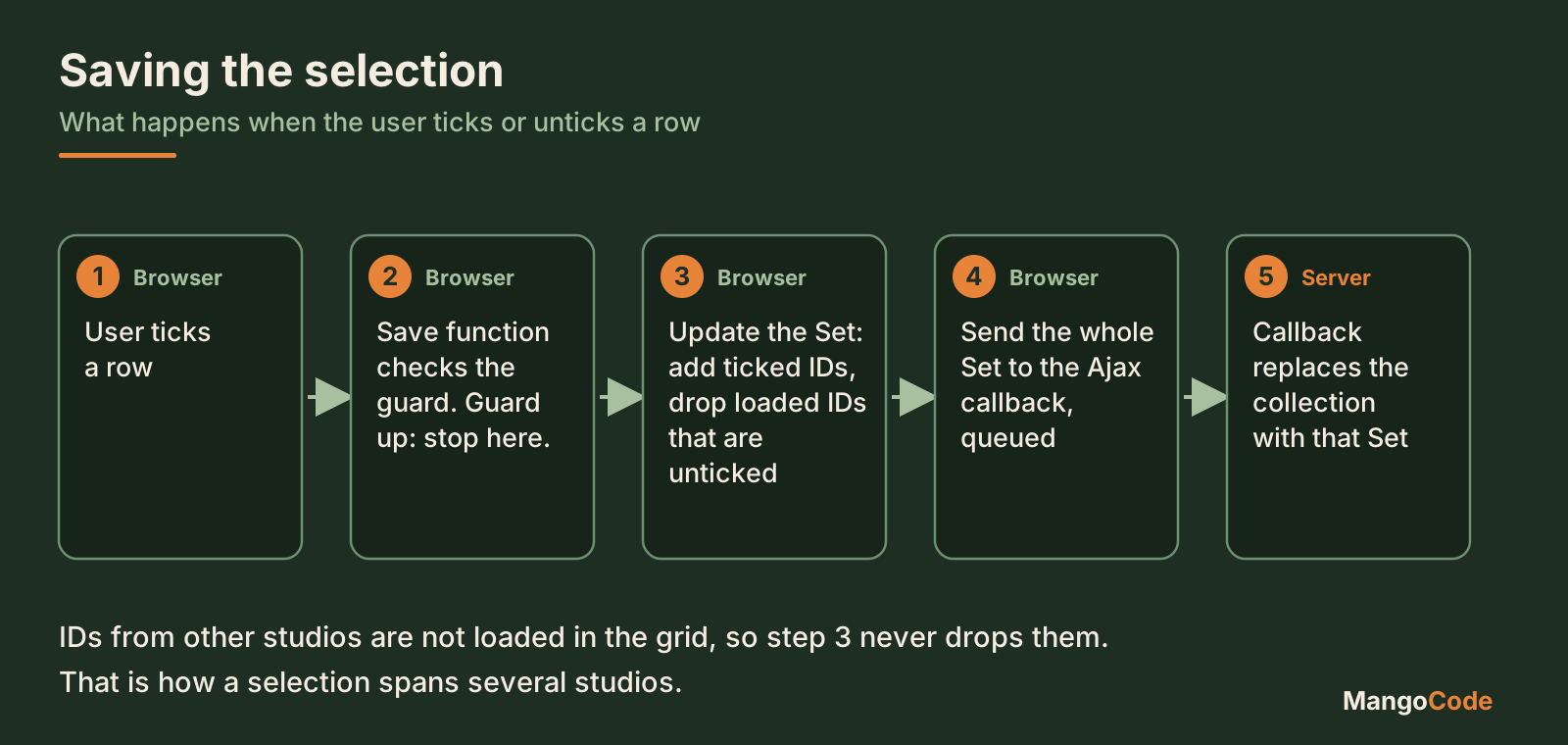
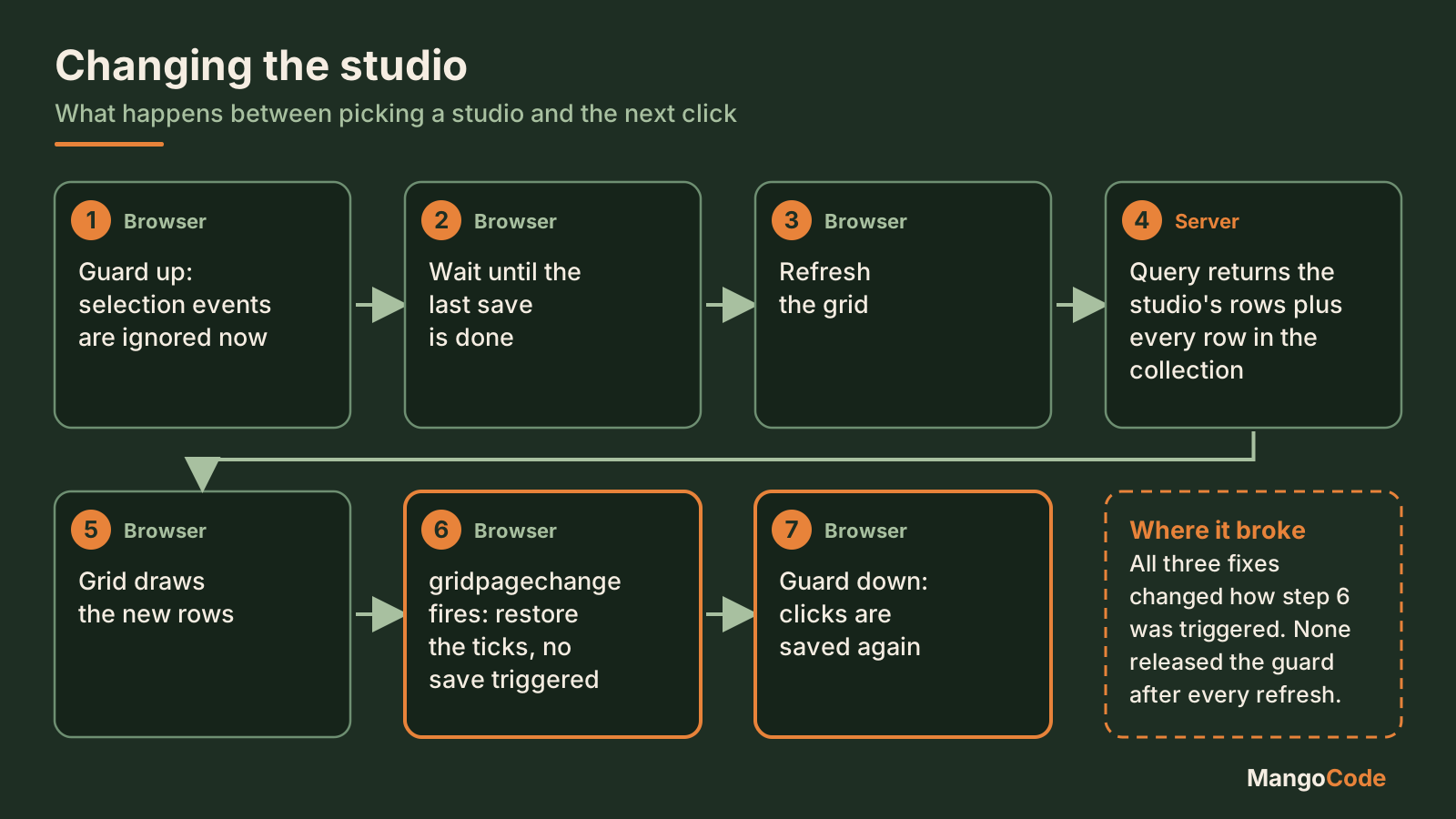
Steps 6 and 7 belong together: the restore is what lowers the guard. If step 6 never runs, every click after that refresh is thrown away.
Where it went wrong
All three of Copilot's fixes were about step 6: when should the restore run? It tried the moment the data arrives, which is before the grid has drawn it. It tried a gridpagechange listener delegated from a parent element, next to a leftover model subscriber that still raised the guard. And it tried the grid's pageChange callback.
None worked and the reason only showed up when I logged the click itself, at the start of the save function:
refreshing: true
checkedIds: ['1001']
savedIds: []
The click arrived with the right ID, but the guard was still up from the previous refresh. The first click was never saved. We had been fixing the restore while the real failure was one step earlier.
One more thing helped. Copilot was reasoning from an old export of the application for a while. A fresh export showed the page matched its instructions exactly, which meant the instruction itself was wrong. When an AI's answers stop making sense, check what it is looking at.
The cause. The Interactive Grid source in APEX 24.2 (widget.interactiveGrid.js, inside the grid view's initView function) builds its own options object, lGridOptions, with its own pageChange:
pageChange: function ( event, ui ) {
    lIg._pageChange( ui );
}
Then it creates the grid widget:
lThisView.view$.grid( {}, lDefaultGridViewOptions, lGridOptions );
Your defaultGridViewOptions go in first and APEX's options last. The last one wins. A pageChange you set is silently overwritten. The APEX JavaScript API reference does warn that the Interactive Grid may override some of these settings, but I had never read it and I do not know many developers who have.
The fix: leave pageChange alone and bind a gridpagechange listener directly on the grid view. It sits next to APEX's callback instead of competing with it.
The working setup, step by step
Names used: page 10, an Interactive Grid with static ID anime, a studio select list P10_STUDIO, key column ANIME_ID, collection SELECTED_ANIME.
1. Server side. The grid query includes the collection IDs as shown above and the region submits P10_STUDIO on refresh. An Ajax callback STORE_SELECTED_ANIME:
- receives a sequence number per ID in
f01and the anime IDs inf02 - replaces the contents of
SELECTED_ANIMEwith the submitted IDs, stored inC001 - empties the collection when no IDs are submitted
- returns JSON
The sequence in f01 is what the existing callback at the client expected. The browser always sends the full set, so the server does not need to know which studio an ID came from.
2. Selection state and restore. In the page's Function and Global Variable Declaration:
// Selected anime IDs across all studios.
var animeSelection = {
    ids: new Set(),
    refreshing: false,
    pending: apex.jQuery.Deferred().resolve().promise()
};

// Put checkmarks back on loaded rows without triggering a save.
function restoreAnimeSelection() {
    var grid = apex.region("anime").widget()
        .interactiveGrid("getViews", "grid");
    if (!grid || !grid.model) return;

    animeSelection.refreshing = true;
    var records = [];
    grid.model.forEach(function (record) {
        var animeId = String(grid.model.getValue(record, "ANIME_ID"));
        if (animeSelection.ids.has(animeId)) records.push(record);
    });

    var selectedCount = grid.view$.grid("setSelectedRecords", records, false, true);
    if (selectedCount !== -1) animeSelection.refreshing = false;
}
The third argument of setSelectedRecords suppresses the selection change event, so restoring does not trigger a save. The guard only comes down when setSelectedRecords does not return -1, which in our investigation meant the grid was not ready yet. The next gridpagechange then tries again.
3. The save function. Same place:
// Merge the current grid selection into the accumulated set
// and save the whole set to the collection.
function storeSelectedAnime(data, columnName) {
    if (animeSelection.refreshing) return;

    var checked = new Set(data.selectedRecords.map(function (record) {
        return String(data.model.getValue(record, columnName));
    }));

    // Loaded but not ticked means the user unticked it.
    data.model.forEach(function (record) {
        var animeId = String(data.model.getValue(record, columnName));
        if (!checked.has(animeId)) animeSelection.ids.delete(animeId);
    });
    checked.forEach(function (animeId) {
        animeSelection.ids.add(animeId);
    });

    var selectedValues = Array.from(animeSelection.ids);

    animeSelection.pending = apex.server.process("STORE_SELECTED_ANIME",
        {
            f01: selectedValues.map(function (value, index) { return index + 1; }),
            f02: selectedValues
        },
        {
            dataType: "json",
            queue: { name: "anime-selection", action: "wait" }
            // keep your existing success handler here
        });
}
model.forEach only visits rows loaded in the browser, which is why IDs from other studios survive.
Call it from a Dynamic Action on Selection Change [Interactive Grid], Execute JavaScript Code, Fire on Initialization off:
storeSelectedAnime(this.data, "ANIME_ID");
4. Grid initialization. In the region's Initialization JavaScript Function:
function (config) {
    config.initialSelection = false;
    config.defaultGridViewOptions = config.defaultGridViewOptions || {};
    config.defaultGridViewOptions.persistSelection = true;
    return config;
}
persistSelection keeps the selection while paging, not across a refresh. And no pageChange here.
5. The listener. In Execute when Page Loads:
// APEX owns pageChange, so listen to the event instead.
var animeGrid = apex.region("anime").widget()
    .interactiveGrid("getViews", "grid");

animeGrid.view$
    .off("gridpagechange.animeSelection")
    .on("gridpagechange.animeSelection", function () {
        window.requestAnimationFrame(restoreAnimeSelection);
    });

window.requestAnimationFrame(restoreAnimeSelection);
Bind directly to view$, not delegated from a parent element. The namespace means .off only removes this listener. requestAnimationFrame waits until the browser has finished rendering and the last line restores once for the grid already on screen.
6. The studio refresh. A Dynamic Action on Change of P10_STUDIO. The first true action, before anything that clears other filters, is Execute JavaScript Code, Fire on Initialization off:
animeSelection.refreshing = true;
Then replace the native Refresh action with Execute JavaScript Code:
animeSelection.refreshing = true;
animeSelection.pending.done(function () {
    apex.region("anime").refresh();
}).fail(function () {
    animeSelection.refreshing = false;
});
Disable the old native Refresh action, otherwise the grid refreshes twice and the first refresh does not wait for the save.
When it still does not work
Put this at the very start of the save function, before the guard check:
console.log("Selection callback", {
    refreshing: animeSelection.refreshing,
    checkedIds: data.selectedRecords.map(function (record) {
        return String(data.model.getValue(record, columnName));
    }),
    savedIds: Array.from(animeSelection.ids)
});
| What you see after ticking a row | Where it stopped |
|---|---|
| No log line at all | The Selection Change Dynamic Action is not firing. Check it and the browser console for errors. |
checkedIds filled, refreshing: true |
The guard is blocking the click. The restore is not running after the refresh, so check the gridpagechange listener. |
IDs in savedIds, but not in the collection |
The Ajax call or the callback failed. Check the network response and the PL/SQL. |
| IDs saved, but no checkmarks after refresh | The restore runs but finds nothing. Check that those rows are loaded in the grid. |
Remove the log when you are done.
Test it and know the limits
Reload the page first. Pick Madhouse and tick Frieren. Pick MAPPA: Frieren stays ticked. Tick Jujutsu Kaisen and pick Ufotable: both stay ticked. Untick Frieren and change studio: Frieren is no longer selected. Untick the last one: the collection is empty. Check the collection through Session State in the APEX developer toolbar.
A full page reload brings the original bug back if the collection survives it. The browser Set starts empty while the server still holds the old IDs, so the next tick replaces them. Clear the collection when the page loads, or make sure the selection cannot span a reload.
Paging, rapid filter changes, failed Ajax calls, an empty studio and programmatic selection all deserve their own test. And do not remove the guard because it caused trouble: without it, the empty selection event from a refresh wipes the saved set again.
The full story of the investigation, with each of the three fixes, why they failed and what checking the AI's input changed, is available for members.
Have you ever spent your time fixing the second step of a bug while the first step was the one that was broken?